Order confirmations, password resets and invoices are email. Email Health Check & Log for WooCommerce is a free email health check plugin. It looks at how your site sends email and helps you find the likely reasons your store’s emails go to spam or never arrive: it shows what is wrong with your setup and what to change, in plain words.
Free. No account. No email address needed to download. No popups.
- No account. Nothing to sign up for, no upsell banners or popups; one plain text link about a possible Pro add-on.
- The log stays in your database. Only a partly hidden address is kept, never the message.
- Nothing is sent to us. The plugin sends no data to its authors.
- Works next to your mail plugin. Use any SMTP plugin or mail service, or none.
What the plugin does
Health report
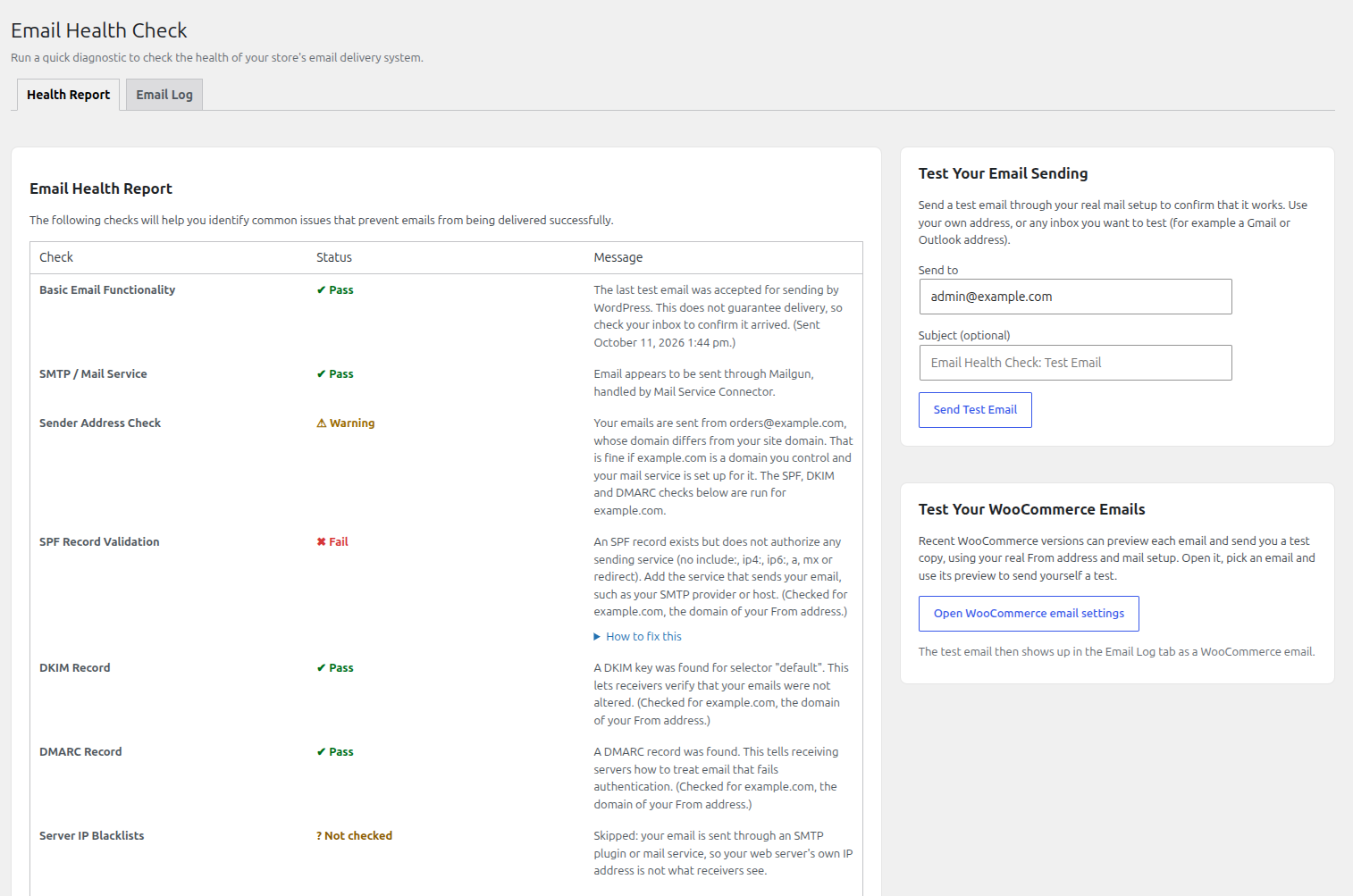
One page shows Pass, Warning or Fail for each check: how your site sends email, the sender address, and your domain’s SPF, DKIM and DMARC records. (These are three DNS records that tell receiving mail servers your email is genuine.) It opens at once and the checks run in the background.
Fix guidance
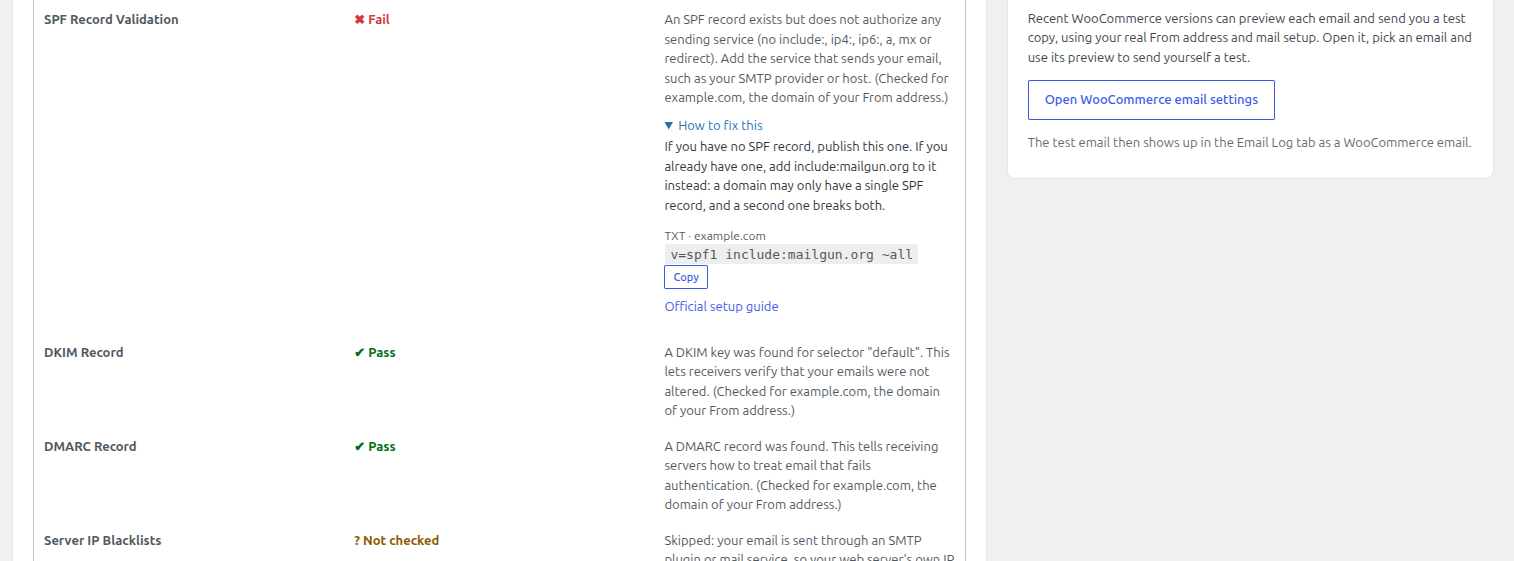
A “Fix this first” summary names the one problem to fix first. Failing SPF, DKIM and DMARC checks show a record you can copy, where your provider documents one, and a link to your provider’s own setup guide.
Email log
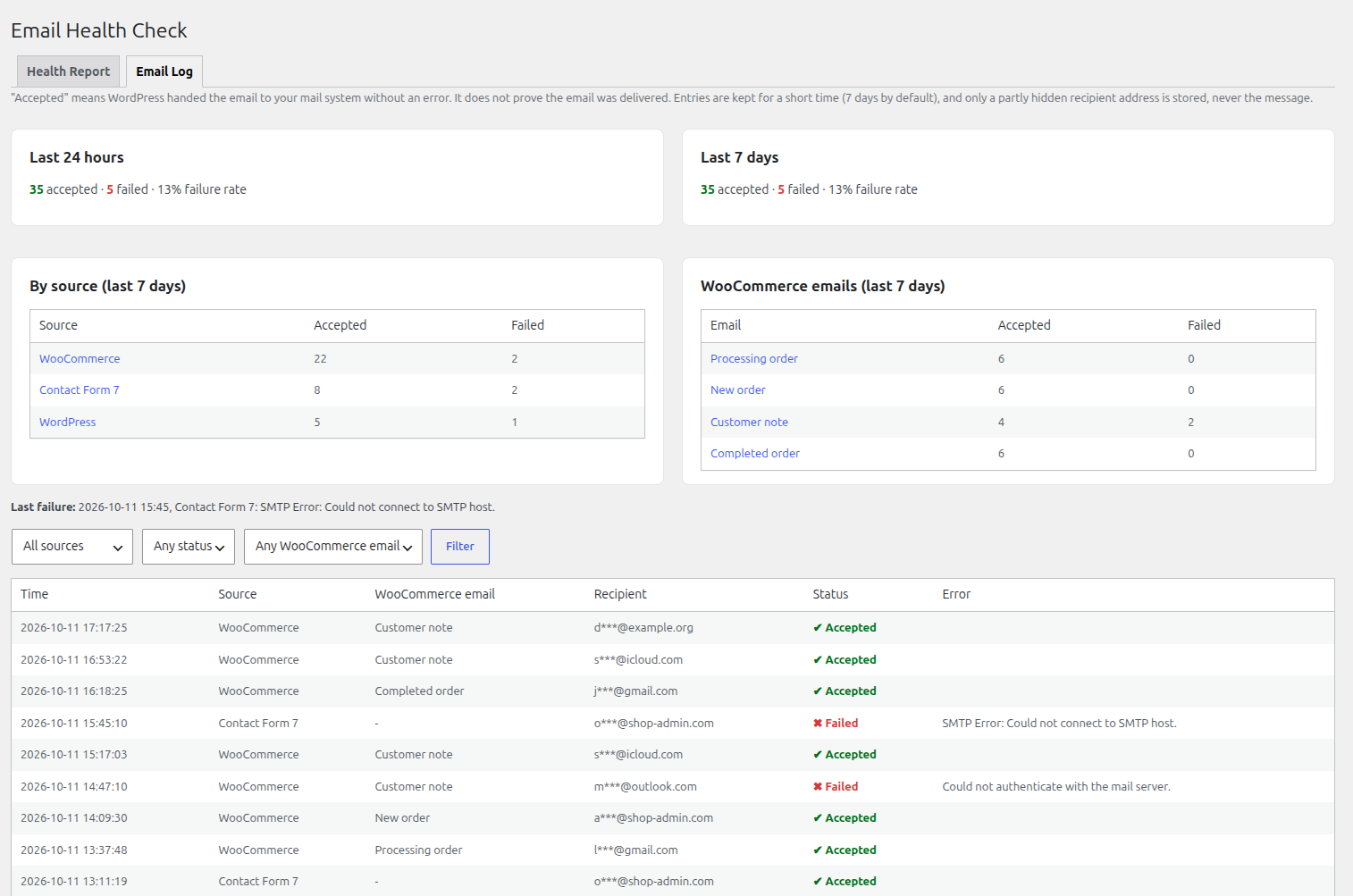
See which emails your site sent, which plugin sent them, their WooCommerce email type, and whether each was accepted or failed, with the error. Filter the list and see counts for the last 24 hours and 7 days.
Warnings in wp-admin
A dashboard widget and a Site Health test warn you when many emails fail, without needing email to work.
WooCommerce email checks
Flags key emails that are switched off, a missing new-order recipient, an invalid From address, outdated theme overrides of email templates, and many orders stuck in “Pending payment” (WooCommerce sends no order emails for those). It only reads your settings.
Test email
Send a test email to your own address or to any inbox you want to try. The result shows right away, with the error if it failed.
How it works
Install it
In your dashboard go to Plugins > Add New, search for “Email Health Check”, then install and activate it.
Open the report
Open “Email Health Check” in your wp-admin menu. The page opens at once and the checks run in the background.
Fix the top problem
The “Fix this first” summary names the check to deal with first and links to its fix. Then send a test email to see the result.
See the report and the log
Want a quick look at your domain first?
The free checker looks up your domain’s SPF, DKIM and DMARC records and says, in plain words, what is in place and what to fix. Type a domain. No sign-up, and no results stored.
Fix guides for common email problems
Avoid WooCommerce emails going to spam
Start here if order emails or password resets do not reach customers.
Gmail redirect_uri_mismatch when connecting an SMTP plugin
Fix the Google sign-in error when you connect your mail plugin to a Google account.
Yahoo and Outlook rejecting your emails
What the sender requirements say, and what they mean for store email.
SPF “too many DNS lookups”
Why the limit of 10 exists and how to get under it.
DMARC for beginners
The first record to publish, what the reports tell you, and how to tighten the policy safely.
What it does not do
- It is not an SMTP plugin (a plugin that sends your email through a proper mail service). It does not send your email for you and does not replace your mail service.
- It does not fix your DNS records for you. It tells you what to change and where.
- It cannot tell you that an email reached the inbox. The log says “Accepted”, not “Delivered”.
- Its blacklist check only looks at two free public lists, so a clean result is not a guarantee of a clean reputation.
- It has no upsell banners. It shows one plain text link, “Follow the Pro plan”, and one dismissible request for a review, only on its own screens.
Your data stays on your site
The plugin stores its email log in your own database, keeps only a partly hidden recipient address (like j***@example.com) and never the message. Entries are deleted after 7 days by default; you can shorten that, turn logging off, or clear the log. The only lookup that involves your server’s IP address is a DNS query to two public blacklists (lists of server addresses known for sending spam), and it runs only when your site sends mail straight from its own server. Read exactly what is sent and when.
Questions
Is the plugin really free?
Yes. It is free, needs no account, and nothing in it is locked or removed. You can download it from WordPress.org without giving an email address.
Does it send my data anywhere?
Nothing is sent to the plugin’s authors. The email log stays in your own database and holds a partly hidden recipient address, never the message. The only lookup that involves your server’s IP address is a DNS query to two public blacklists, and it runs only when your site sends mail straight from its own server. The External services page lists exactly what is sent.
Does it replace my SMTP plugin?
No. It is not an SMTP plugin and does not send your email for you. It works next to whichever plugin or mail service you already use, or with none. If the report says your site uses plain PHP mail, an SMTP plugin or a mail service is the usual fix, and you choose one.
Does it fix my DNS for me?
No. It shows what to change. When an SPF, DKIM or DMARC check fails, it shows a record to copy where your provider documents one, and links to the provider’s setup guide. You add the record at your domain.
Does it work without WooCommerce?
Yes. The report, the email log and the alerts work on any WordPress site. The WooCommerce-specific parts (email types and the unpaid orders check) appear only when WooCommerce is active.
Where do I get help?
Ask in the plugin’s support forum on WordPress.org. See the contact page for other options.
Ready to look at your store’s email?
Install it from Plugins > Add New in your dashboard, or get it from WordPress.org.
A separate Pro add-on is being planned and may never be released. The free plugin stays free. If you are curious, you can follow the Pro plan, or ignore it.
WooCommerce is a trademark of Automattic Inc. This plugin is independent and is not affiliated with or endorsed by WooCommerce or Automattic.